Kamis, 12 Agustus 2010

#Instalasi OpenVPN Client di Linux

Install aplikasi GUI utuk client

# apt-get install kvpnc
# apt-get install network-manager-openvpn openvpn

Copy setting OpenVPN

# cp -Rf /usr/share/doc/openvpn/examples/easy-rsa/* /etc/openvpn/

Pada Ubuntu Hardy 8.04 tampaknya ada beberapa versi konfigurasi, kita dapat menggunakan salah satu dengan cara

# cp -Rf /etc/openvpn/2.0/* /etc/openvpn/

Selanjutnya lakukan langkah berikut, yang sama dengan versi lainnya

# cd /etc/openvpn
# mkdir /etc/openvpn/keys

Lakukan langkah berikut

# vi vars
# , ./vars
# ./clean-all

Atau copy file /etc/openvpn/vars dari Server. Copy key client dari Server

# scp -r root@192.168.0.3:/etc/openvpn/keys/ca.crt /etc/openvpn/keys
# scp -r root@192.168.0.3:/etc/openvpn/keys/user1.crt /etc/openvpn/keys
# scp -r root@192.168.0.3:/etc/openvpn/keys/user1.key /etc/openvpn/keys


Menjalankan VPN Client (client.conf from www.openvpn.org)

# openvpn --config /etc/openvpn/client.conf


Contoh Client.conf adalah sebagai berikut,

# vi /etc/openvpn/client.conf

isinya kurang lebih

# Specify that we are a client and that we
# will be pulling certain config file directives
# from the server.
client
# Use the same setting as you are using on
# the server.
# On most systems, the VPN will not function
# unless you partially or fully disable
# the firewall for the TUN/TAP interface.
; dev tap
dev tun
# Windows needs the TAP-Win32 adapter name
# from the Network Connections panel
# if you have more than one. On XP SP2,
# you may need to disable the firewall
# for the TAP adapter.
; dev-node MyTap
# Are we connecting to a TCP or
# UDP server? Use the same setting as
# on the server.
;proto tcp
proto udp
# The hostname/IP and port of the server.
# You can have multiple remote entries
# to load balance between the servers.
;remote my-server-1 1194
;remote my-server-2 1194
remote 192.168.0.3 1194
# Choose a random host from the remote
# list for load-balancing. Otherwise
# try hosts in the order specified.
;remote-random
# Keep trying indefinitely to resolve the
# host name of the OpenVPN server. Very useful
# on machines which are not permanently connected
# to the internet such as laptops.
resolv-retry infinite
# Most clients don't need to bind to
# a specific local port number.
nobind
# Try to preserve some state across restarts.
persist-key
persist-tun
# If you are connecting through an
# HTTP proxy to reach the actual OpenVPN
# server, put the proxy server/IP and
# port number here. See the man page
# if your proxy server requires
# authentication.
;http-proxy-retry # retry on connection failures
;http-proxy [proxy server] [proxy port #]
# Wireless networks often produce a lot
# of duplicate packets. Set this flag
# to silence duplicate packet warnings.
;mute-replay-warnings
# SSL/TLS parms.
# See the server config file for more
# description. It's best to use
# a separate .crt/.key file pair
# for each client. A single ca
# file can be used for all clients.
ca keys/ca.crt
cert keys/client.crt
key keys/client.key
# Verify server certificate by checking
# that the certicate has the nsCertType
# field set to "server". This is an
# important precaution to protect against
# a potential attack discussed here:
# http://openvpn.net/howto.html#mitm
#
# To use this feature, you will need to generate
# your server certificates with the nsCertType
# field set to "server". The build-key-server
# script in the easy-rsa folder will do this.
;ns-cert-type server
# If a tls-auth key is used on the server
# then every client must also have the key.
;tls-auth ta.key 1
# Select a cryptographic cipher.
# If the cipher option is used on the server
# then you must also specify it here.
;cipher x
;cipher AES-128-CBC
# Enable compression on the VPN link.
# Don't enable this unless it is also
# enabled in the server config file.
; comp-lzo
# Set log file verbosity.
verb 3
# Silence repeating messages
;mute 20


Cara menjalankan VPN client dengan client.conf (from www.openvpn.org)

# openvpn --config /etc/openvpn/client.conf

#Instalasi OpenVPN di Windows

Download OpenVPN di Windows dari

http://openvpn.se/download.html

File yang dapat di download

http://openvpn.se/files/install_packages/openvpn-2.0.9-gui-1.0.3-install.exe
http://openvpn.se/files/binary/openvpn-gui-1.0.3.exe


  • Jalankan / Klik openvpn-2.0.9.gui-1.0.3-install.exe. Silahkan dilihat Capture Screen Proses Instalasi OpenVPN di Windows, untuk lebih jelasnya apa yang terjadi pada saat instalasi.
  • Masuk ke directory C:\Program Files\OpenVPN\config
  • Buat directory C:\Program Files\OpenVPN\config\keys
  • Copy file ca.crt, user-client.crt, dan user-client.key ke C:\Program Files\OpenVPN\config\keys
  • Buat file text client.ovpn di Folder C:\Program Files\OpenVPN\config. Isinya adalah,
# Specify that we are a client and that we
# will be pulling certain config file directives
# from the server.
client
# Use the same setting as you are using on
# the server.
# On most systems, the VPN will not function
# unless you partially or fully disable
# the firewall for the TUN/TAP interface.
dev tap
; dev tun
# Windows needs the TAP-Win32 adapter name
# from the Network Connections panel
# if you have more than one. On XP SP2,
# you may need to disable the firewall
# for the TAP adapter.
; dev-node MyTap
# Are we connecting to a TCP or
# UDP server? Use the same setting as
# on the server.
;proto tcp
proto udp
# The hostname/IP and port of the server.
# You can have multiple remote entries
# to load balance between the servers.
;remote my-server-1 1194
;remote my-server-2 1194
remote 192.168.0.3 1194
# Choose a random host from the remote
# list for load-balancing. Otherwise
# try hosts in the order specified.
;remote-random
# Keep trying indefinitely to resolve the
# host name of the OpenVPN server. Very useful
# on machines which are not permanently connected
# to the internet such as laptops.
resolv-retry infinite
# Most clients don't need to bind to
# a specific local port number.
nobind
# Try to preserve some state across restarts.
persist-key
persist-tun
# If you are connecting through an
# HTTP proxy to reach the actual OpenVPN
# server, put the proxy server/IP and
# port number here. See the man page
# if your proxy server requires
# authentication.
;http-proxy-retry # retry on connection failures
;http-proxy [proxy server] [proxy port #]
# Wireless networks often produce a lot
# of duplicate packets. Set this flag
# to silence duplicate packet warnings.
;mute-replay-warnings
# SSL/TLS parms.
# See the server config file for more
# description. It's best to use
# a separate .crt/.key file pair
# for each client. A single ca
# file can be used for all clients.
ca keys/ca.crt
cert keys/onno.crt
key keys/onno.key
# Verify server certificate by checking
# that the certicate has the nsCertType
# field set to "server". This is an
# important precaution to protect against
# a potential attack discussed here:
# http://openvpn.net/howto.html#mitm
#
# To use this feature, you will need to generate
# your server certificates with the nsCertType
# field set to "server". The build-key-server
# script in the easy-rsa folder will do this.
;ns-cert-type server
# If a tls-auth key is used on the server
# then every client must also have the key.
;tls-auth ta.key 1
# Select a cryptographic cipher.
# If the cipher option is used on the server
# then you must also specify it here.
;cipher x
;cipher AES-128-CBC
# Enable compression on the VPN link.
# Don't enable this unless it is also
# enabled in the server config file.
# comp-lzo
# Set log file verbosity.
verb 3
# Silence repeating messages
;mute 20


  • Pastikan Windows Firewall dimatikan
  • Klik Kanan bawah OpenVPN GUI -> Connect

#Mikrotik: Sample Load Balancing di Game Center untuk Speedy

Ringkasan ini tidak tersedia. Harap klik di sini untuk melihat postingan.

#Memblok Situs Tidak Baik Menggunakan ACL Squid

Pertama buat acl yang berisi daftar situs yang mau diblok, misal dengan nama blok

# vi /etc/squid/blok.txt

masukkan daftarnya disini, tekan :wq untuk menyimpan (jika menggunakan vi)

acl blok url_regex -i “/etc/squid/blok.txt”
http_access deny blok

reload konfigurasi squid

# squid -k reconfigure

Sampai sini situs yang ada di file blok.txt sudah diblok. sekedar untuk variasi pesan error (secara default usr akan mendapatkan pesan error Access Denied). ini juga bisa untuk menghindari kecurigaan klien:D

deny_info ERR_DNS_FAIL blok

jadi dari sekian banyak blacklist bisa dibagi menjadi beberapa bagian dengan pesan error yang beda-beda. File yang akan digunakan untuk memberikan pesan error ada di

/usr/share/squid/errors/English


ok its Done :)

Selasa, 10 Agustus 2010

#DAV Player

Sabtu, 31 Juli 2010

#Folder option

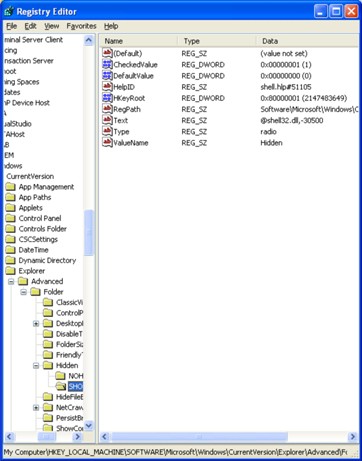
Silakan buka menu regedit pada system, dengan cara buka run pada start menu, kemudian tekan button run, setelah itu tulis text ‘regedit’ dan kemudian akan muncul window “Registry Editor”. Secara berturut-turut buka HKEY_LOKAL_MACHINE => SOFTWARE => Microsoft => Windows => CurrentVersion => Explorer => Advanced => Folder. Kemudian buka satu persatu, Hidden => NOHIDDEN, setting kembali value nya, pertama bagian CheckedValuepastikan bernilai 2, kemudian DefaultValue pastikan bernilai 2.
nohidden.jpg
Kemudian setiing padabagian SHOWALL dengan menyetting kembali nilai CheckedValue, pastikan bernilai 1, sedangangkan DefaultValue pastikan bernilai 0.
showall.jpg
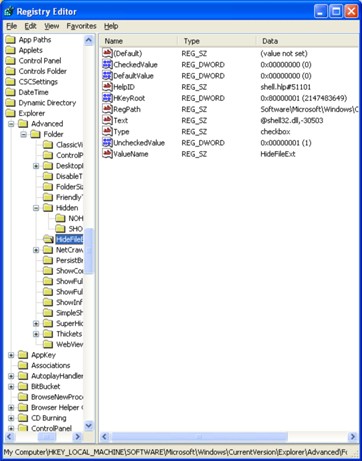
Kemudian buka bagian HideFileExt untuk menyetting default value file extention. Setting bagian CheckedValue, pastikan bernilai 0. Kemudian DefaultValue, pastikan bernilai 0. Dan pada UncheckedValue, pastikan bernilai 1.
hidefileext.jpg
Kemudian yang terakhir, kita akan mengembalikan kondisi system file. Setting pada bagian SuperHidden. Lakukan setting dengan nilai seperti HideFile Ext, dimana pada CheckedValue bernilai 0, DefaultValue bernilai 0 dan pada UncheckedValue bernilai 1.
superhidden.jpg
Cukup simple dan mudah-mudahan berguna. Setting folder option anda akan kembali seperti semula.

Jumat, 30 Juli 2010

#Hidup apakah sebenarnya ini ?

Tanpa kusadari kehidupan ini sudah mulai berada dimasa saat aku harus mulai instropeksi diri. Apa yang telah kulakukan selama ini? Apa yang kuinginkan selama ini ? Semuanya terasa mengalir begitu saja tanpa tujuan yang pasti. Kadang aku merasa sifat egosentris manusia yang ada dalam diriku sering membawaku ke kondisi dimana tidak ada harapan bagi kehidupan diselanjutnya. Arus mainstream yang sangat deras di masyarakat sekarang ini seakan2 memaksa semua orang untuk melakukan apa yang sebenarnya tidak mereka inginkan. Banyak yang merasa " OK semua baik2 saja" namun dalam batinnya merasa terkekang kuat tanpa bisa mengelak.Kebahagiaan seperti hal yang semu untuk dicapai .. dalam hal ini sepertinya kebahagiaan adalah Kesuksesan dunia yang dapat dilihat semua orang . apakah kebahagiaan itu sebenarnya? apakah hal yang relative atau hal yang mutlak ? Aku sering mengingat pesan ini dalam diriku " jadilah yang bermanfaat bagi yang lain dan jadikan yang lain bermanfaat" namun bukan berarti kita memanfaatkan yang lain untuk kepentingan pribadi kita. Ibarat kita seperti lilin dan orang lain adalah lilin yang lain .. apabila kita sudah bercahaya adalah seharusnya kita bebagi cahaya kita pada yang lain agar dunia ini terang. Kenyataan yang kulihat sekarang sangat jauh dari rasa berbagi . Banyak yang merasa tak sanggup untuk melawan arus yang cukup deras ini walupun sebenarnya banyak menginginkannya. akupun juga masih berusaha untuk melawannya. walau kadang sering hanyut juga terbawa entah kemana . Yang aku yakini adalah Tuhan selalu mendekatkan manusia kepada kemuliaan , tinggal bagaimana kita menaggapi hal tersebut. Tuhan selalu bersama kita meski seluruh manusia meninggalkan kita sendiri .

Twitter Delicious Facebook Digg Stumbleupon Favorites More